Profile and monitor CUDA and ROCm workloads
Find slow kernels, idle GPUs, memory bottlenecks, thermal risk, and production regressions from one product dashboard.
Free tier: 1 GB data ingestion per month. No credit card.
From kernel-level profiling to fleet-wide monitoring for AI training, inference, and production workloads.
Automatic GPU kernel instrumentation for NVIDIA (CUPTI) and AMD (ROCm). Capture execution time, occupancy, register usage, and the launches slowing down your pipeline.
GPU instruction-level analysis with PC Sampling and SASS metrics. See exactly where your kernels spend cycles, down to individual assembly instructions.
Hardware-measured achieved occupancy for every kernel via kernel replay, not just the theoretical limit. Plus SM throughput, L1/L2 hit rates, and DRAM traffic per kernel.
One command runs tracing, PC sampling, SASS, and kernel replay as isolated passes, then merges them into a single analysis. Deep metrics without polluting your timings.
Always-on GPU utilization, temperature, power, memory, and fan speed tracking via NVML. Sub-second resolution. Negligible host-side overhead, safe to leave on 24/7.
Zoomable per-stream timeline of every kernel launch and memory transfer, with GPU performance-counter samples overlaid so hardware activity lines up with the code that caused it.
Group kernels by training epoch, inference batch, or any logical boundary with GFL_SCOPE. See exactly which code path launched each kernel and compare the stages that drive GPU cost.
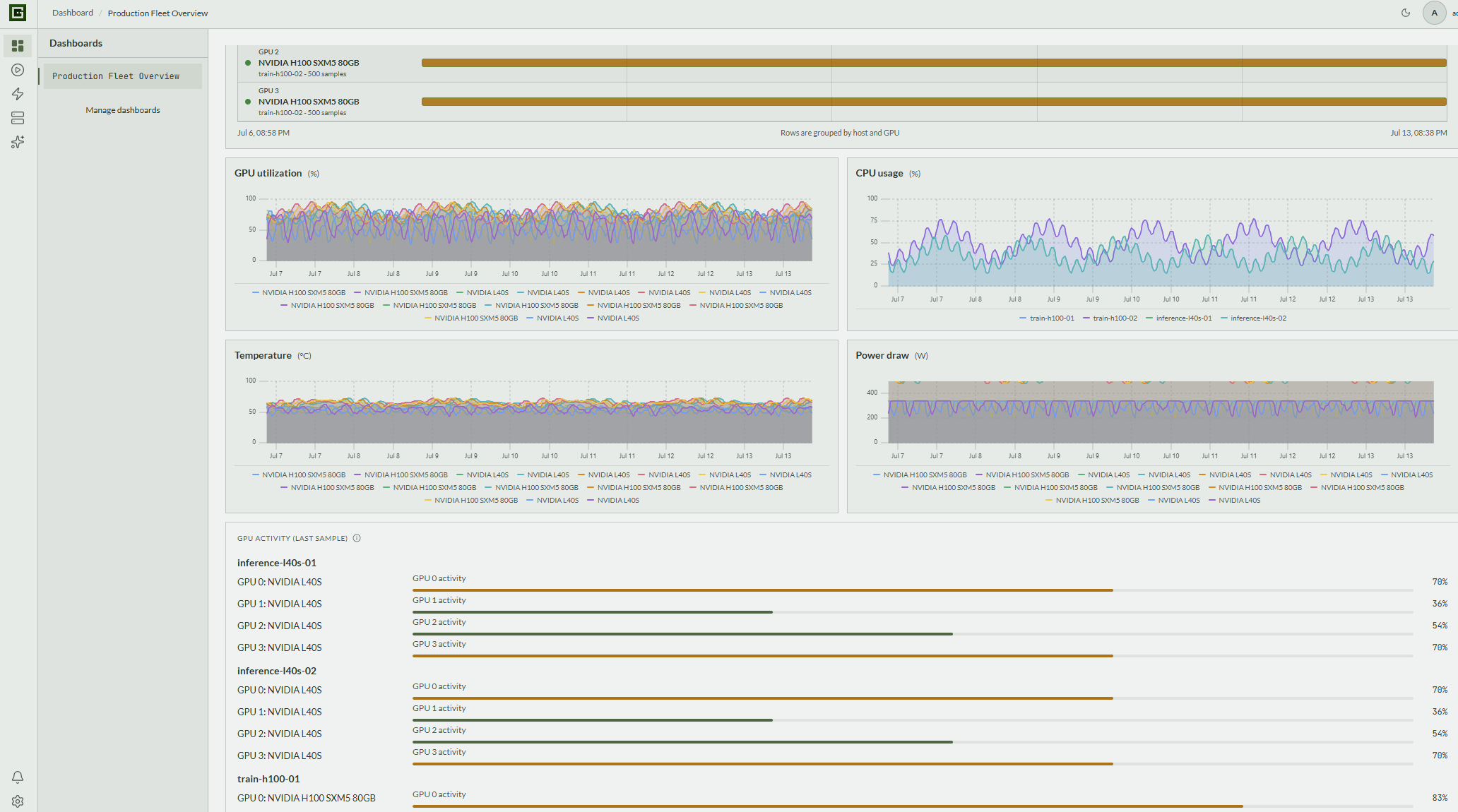
Monitor all GPUs across your cluster in one dashboard. Per-host, per-device views with stale session detection and thermal health gauges.
Automatic detection of low occupancy, memory bottlenecks, and suboptimal kernel configurations. Actionable recommendations for faster GPU and AI pipelines, not just data.
Detailed profiling, SASS analysis, monitoring, and fleet management live together on the same product path.
GPUFlight captures every GPU kernel launch via CUPTI for NVIDIA and ROCTracer for AMD. For each kernel, you get execution time, grid and block dimensions, register usage, shared memory, occupancy breakdown, and the limiting resource. With a kernel-replay pass, theoretical occupancy is joined by measured achieved occupancy from the hardware itself. No sampling bias, no missed launches.
Go deeper with PC Sampling and SASS metrics. See which GPU assembly instructions cause stalls, identify memory bottlenecks at the warp level, and understand divergence patterns. All without recompiling your kernels.
SASS disassembly interleaved with CUDA source, with per-line stall heat from PC sampling. Every memory instruction is scored by access pattern. Coalescing efficiency, cache line utilization, and wasted-bandwidth detection surface the exact load or store burning DRAM sectors, with a plain-English recommendation for how to fix it.
SASS-derived coalescing efficiency, sector counts, and access patterns for every memory instruction. GPUFlight does not just hand you raw numbers. Every session is scanned for divergence, low occupancy, stall hot spots, and memory inefficiencies, then ranked by severity with direct links to the source file, line, and PC offset. Findings, not dashboards.
Warp-stall breakdown and auto-detected issues, ranked by severity with the triggering metrics attached. The monitoring daemon collects GPU utilization, temperature, power draw, memory usage, and fan speed via NVML at sub-second intervals. Zero overhead on your compute workload. See trends across hours or days.
Monitor all GPUs across your cluster from one dashboard. Per-host summaries, per-device drill-downs, stale session detection, and thermal health gauges. Know exactly which machines need attention.
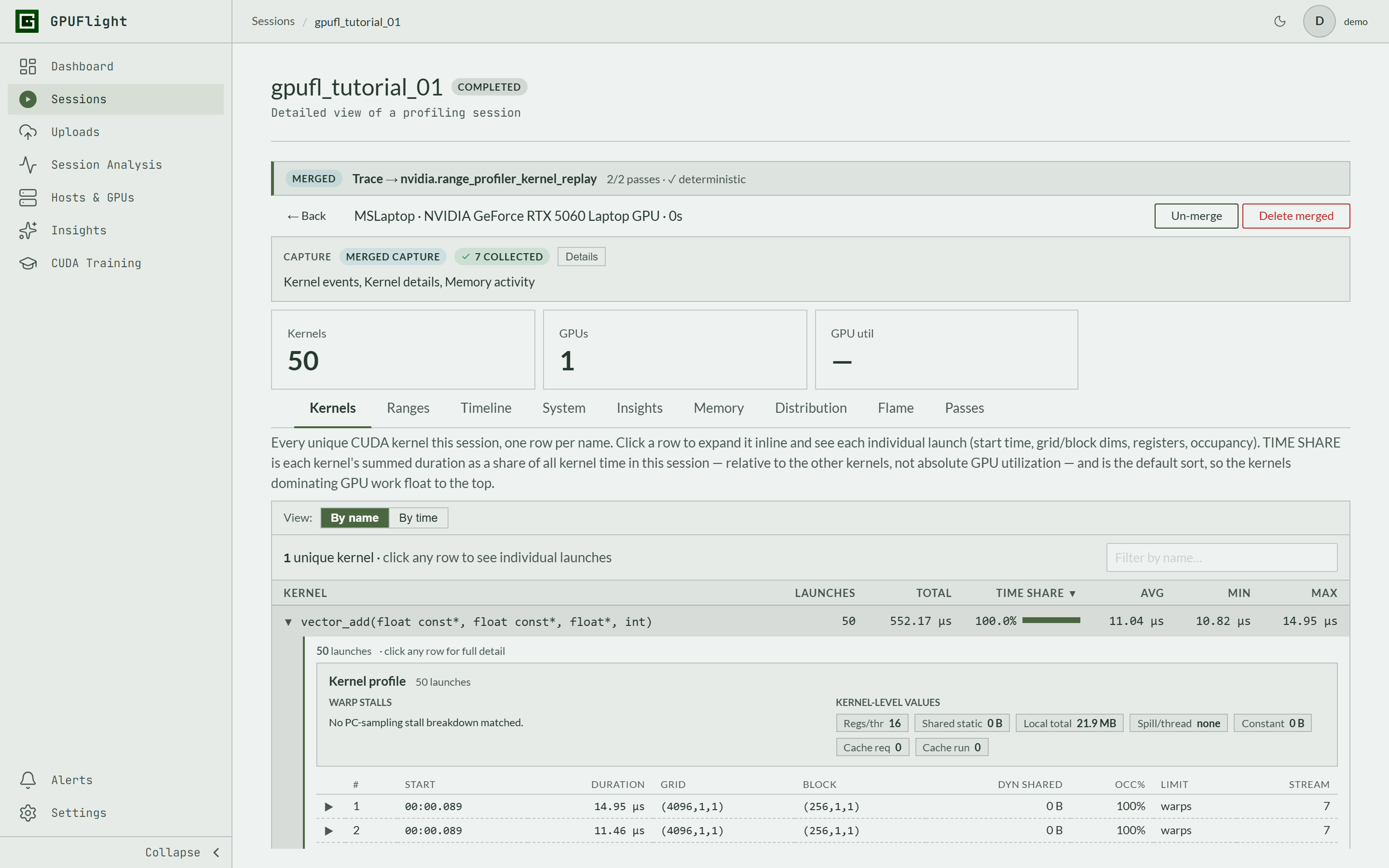
Deep profiling normally distorts the thing you are measuring. GPUFlight runs each collection mode (tracing, PC sampling, SASS metrics, and kernel replay) as its own isolated pass and merges the results into one session, so exact timings and hardware-measured metrics coexist in the same view.
Uploads are tracked end to end: every session walks through uploading, ingesting, finalizing, and ready, with per-upload job rows and timing on the Uploads page. If something fails, you see the error, not a session that silently never appears.
Three steps. No complex setup. No agents hogging your GPU.
The gpufl launcher traces any CUDA program as-is, PyTorch included. Add extra passes for deep, hardware-measured metrics.
# Trace a run and upload it when it exits
gpufl trace --upload -- python train.py
# Go deeper: add an isolated kernel-replay pass
# (measured achieved occupancy, cache hit rates)
gpufl trace --passes=Trace,RangeProfilerKernelReplay -- ./my_app Prefer explicit control? One include, one init call, and wrap the phases you care about with GFL_SCOPE.
#include <gpufl/gpufl.hpp>
int main() {
gpufl::init({ .app_name = "my-training-job" });
GFL_SCOPE("Forward Pass") {
myKernel<<<grid, block>>>(...);
}
gpufl::shutdown();
gpufl::generateReport(); // prints to stdout
} Run the agent alongside your workload to stream data to the dashboard.
# Stream profiling data to GPUFlight Cloud
docker run -d -v /tmp/gpufl:/var/log/gpufl -e GPUFL_HTTP_TOKEN=your-api-key gpuflight/agent:latest
# Or add always-on GPU monitoring
docker compose -f monitor.yml up -d Product screenshots that show GPUFlight in action.
Compare GPU utilization, CPU load, temperature, power draw, and per-GPU activity across the same time window to see how workload behavior affects the entire system.
The monitoring timeline distinguishes active, low-utilization, no-sample, and time-break intervals, so a quiet chart never hides a collector that silently stopped.
One command runs isolated profiling passes: kernel tracing plus hardware kernel replay. GPUFlight merges them into a single session view with exact timings and measured hardware metrics side by side.
Zoom into every kernel launch on a stream-by-stream timeline, with GPU performance-counter (PM) samples overlaid. Line up SM activity and memory throughput with the exact kernels that caused them.
Every upload is tracked through the ingestion pipeline: uploading, ingesting, finalizing, and ready. You always know whether a session is still processing or something needs attention.
The profiling data you need to optimize training, inference, and production workloads without stopping them.
Deep kernel diagnostics during development. Continuous, low-overhead sampling in production. Same SDK and dashboard for local kernel tuning and deployed AI jobs.
SASS disassembly, PC Sampling stall analysis, and memory coalescing efficiency, per instruction and per kernel.
Live GPU metrics, kernel traces, and AI-powered insights streamed to a web dashboard as your code runs.
Monitor every GPU across your cluster from one place. Per-host, per-device views with health gauges.
Start free. Step up to Practice for uncapped labs and multi-pass Workbench, or scale to more GPUs, retention, and seats.
For exploring GPUFlight and occasional GPU practice.
For engineers and students building hands-on CUDA and GPU performance skills.
For solo engineers profiling and optimizing real workloads.
For small engineering teams sharing GPU performance data and workflows.
For organizations needing custom scale, security, and support.
Free tier: 1 GB data ingestion per month. No credit card. NVIDIA or AMD.